4.5.35. Other maps

4.5.36. POI as Navit Text maps

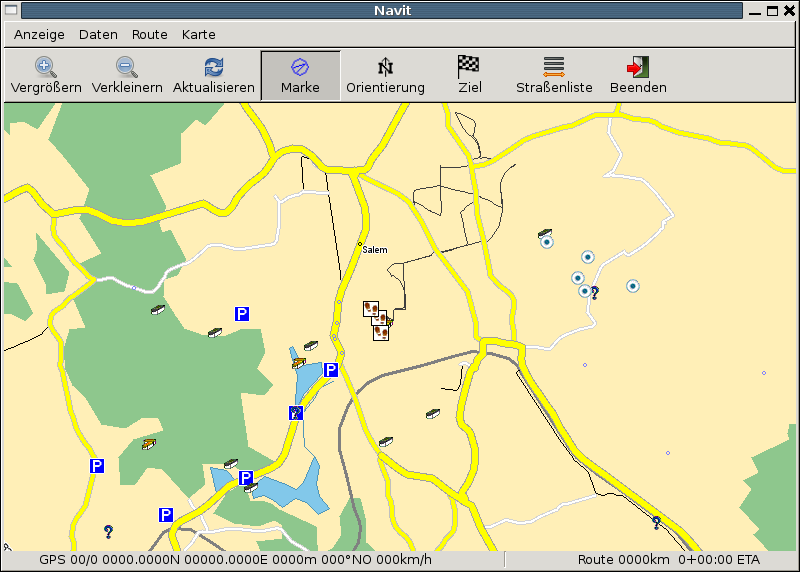
You can display Points of Interest as a Navit map. Therefore was built a utility called gpx2navit_txt which converts gpx files to navit text map-Files. It is possible to convert waypoints and tracks.

Insert the text map Files into the navit.xml like this:

``        ``
``               ``
``               ``

and you will get the poi-data on the map.

That will look like this: POI
4.5.37. Troubleshooting

If nothing is displayed

* check the area of the map
* check if the items of the textfile are defined in your 'navit.xml'
* this is also true for tracks - here it might be that the track is hidden by other objects, check the 'navit.xml'
* check if the xpm-Files are defined and accessible

For example imagine:

* in the text-map you converted with 'gpx2navit_txt' is a type='poi_gc_multi' for a Multicache
* Then the navit symbol will be 'poi_gc_multi' and has to be defined in 'navit.xml' (see for 'example poi_airport')
* the xpm file (normally under '/usr/local/share/navit/xpm') 'gc_multi.xpm' must be present
* for track-display the type is 'track' and 'track' must be defined in 'navit.xml'

If tracks or routes from gpx are not converted

* error message 'no move recorded' --> use '-f' flag of gpx2navit_txt

4.5.38. Convert CSV POIs to Navit format

Many commercial Navigators use the CVS format for Point of Interest files.

You can convert them to the navit txt format using a script like these:

4.5.38.1. Bash version

#!/bin/bash
# Marco Trevisan (Treviño) -- Copyright 2009
# Released under the GPLv2 terms.

csvfile="$1"
poitxtfile="$PWD/$(basename "$csvfile" .csv).txt"
poi_type=""

if [ ! -f "$csvfile" ] || !(echo "$(head "$csvfile" -n1)" | grep -q "[^,]\+,[^,]\+,[^,]\+"); then
    echo "You must provide a valid csv file"
    exit 1
fi

rm -f "$poitxtfile"
echo "Parsing file $csvfile..."
filelen=$(wc -l "$csvfile"|cut -f1 -d' ')
linen=1

while read line; do
    lon=$(echo "$line" | cut -f1 -d',')
    lat=$(echo "$line" | cut -f2 -d',')
    name=$(echo "$line" | cut -f3 -d',')

    poi_label="$name"
    poi_desc="$name"

    if [ -z "$poi_type" ]; then
        poi_type="poi_attraction"
    fi

    echo "type=$poi_type label=\"$poi_label\" description=\"$poi_desc\" gc_type=\"\"" >> $poitxtfile
    echo "$lon $lat" >> $poitxtfile

    status="\t$csvfile ($linen/$filelen)"
    if [ $linen -gt 1 ]; then
        for ((k=0; $k < $(expr length "$status"); k++)); do
            echo -n -e "\b"
        done
    fi

    if [ $linen != $filelen ]; then
        echo -e -n "$status"
    fi

    linen=$(($linen+1))
done < "$csvfile"

echo "POI file saved in $poitxtfile"

4.5.38.2. Python Version

Much more quick.

#!/usr/bin/python
# Convert CSV-POI files to Navit
# Marco Trevisan (3v1n0) -- Copyright 2009
# Released under the GPLv2 terms.

import os, sys, re

poi_type = ""

csvmatch = re.compile("([^,]+),([^,]+),([^,]+)\n")

for currentfile in sys.argv[1:]:
    if os.path.exists(currentfile):
        csvfile = open(currentfile, 'r')
        print "Parsing "+currentfile+"..."
        filelen = len(csvfile.readlines())
        linen = 1
        csvfile.seek(0)
        outlist = []

        for line in csvfile:
            cvsparts = re.match(csvmatch, line)
            if cvsparts:
                lon = cvsparts.group(1)
                lat = cvsparts.group(2)
                name = cvsparts.group(3)

                poi_label = name
                poi_desc = ""

                if not poi_type:
                    poi_type = "poi_attraction"

                outlist.append('type=%s label="%s" description="%s" gc_type=""\n' %
                                                 (poi_type, poi_label, poi_desc))
                outlist.append("%s %s\n" % (lon, lat))

            status = "\t%s (%d/%d)" % (os.path.basename(currentfile), linen, filelen)
            print status,"\r",
            sys.stdout.flush()

            linen += 1
        csvfile.close()

        if outlist:
            outfile = os.path.splitext(currentfile)[0]+".txt"
            print "\nWriting output at %s..." % outfile
            gpxfile = open(outfile, 'w')
            gpxfile.writelines(outlist)
            gpxfile.close

4.5.38.3. GPSBabel style file

GPSBabel is a GPS waypoint, route, and track data converter.

This style file can be used to build a bookmark file for use with Navit. Note that this style can not be used to read a navit file, because Navit () writes coordinates using hexadecimal and GPSBabel style files do not seem to support reading hexadecimal. Also, spaces in waypoint labels are dropped.

# gpsbabel XCSV style file

DESCRIPTION             Navit bookmarks
EXTENSION               txt
DATATYPE                WAYPOINT

# FILE LAYOUT DEFINITIIONS:
#
FIELD_DELIMITER         SPACE
RECORD_DELIMITER        NEWLINE
FORMAT_TYPE             INTERNAL
SHORTLEN                30
SHORTWHITE              1

#
# INDIVIDUAL DATA FIELDS:
#
IFIELD  LON_DECIMAL, "", "mg:%f"
IFIELD  LAT_DECIMAL, "", "%f"
IFIELD  CONSTANT, "type=bookmark", "%s"
IFIELD  SHORTNAME, "?", "label="%s""